
LaunchX
Open-source macOS launcher with AI coding integration and local-first privacy
 v0 / Vercel
What it is
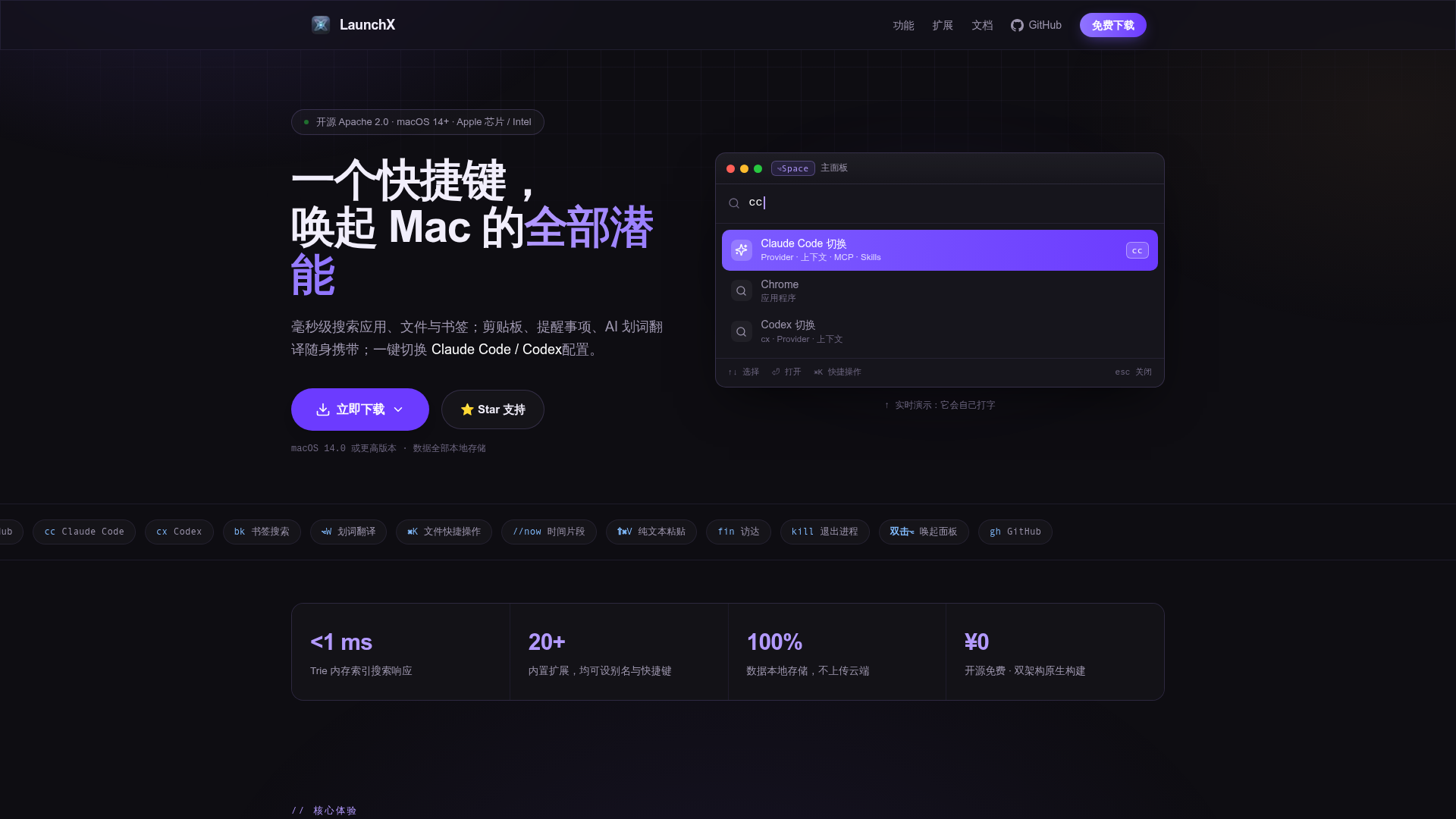
LaunchX is an open-source macOS launcher app that combines universal search, clipboard history, bookmark management, reminders, and AI coding assistant integration into a single keyboard-driven interface. Built with Swift for macOS 14 and later, it runs natively on both Apple Silicon and Intel Macs.
The core experience centers on a millisecond-speed search panel invoked by a double-tap of the Option key. It indexes applications, files, bookmarks, and reminders using a Trie-based in-memory index with fuzzy matching that supports English, pinyin, and abbreviations. Over 20 built-in extensions provide clipboard history (up to 200 items), file shortcuts, snippet expansion, AI-powered translation, two-factor code extraction, system commands, and key remapping. A dedicated cc-switch panel lets developers swap Claude Code and Codex providers, contexts, MCP servers, and skills without editing configuration files.
The tool targets macOS power users, developers, and AI-assisted coders who want a privacy-respecting productivity booster. All data, indexes, clipboard history, settings, stays on the local machine; nothing is uploaded to the cloud. The Apache 2.0 license makes the source code freely available for inspection and contribution.
Users download a DMG from the GitHub Releases page, drag the app to Applications, and grant Accessibility and Full Disk Access permissions as guided. The settings panel (⌘,) offers a unified tool management view where every capability can be toggled, assigned an alias, or bound to a custom hotkey.
LaunchX distinguishes itself by blending a classic Spotlight-style launcher with deep AI coding workflow integration, all in a lightweight native package that emphasizes muscle-memory efficiency through double-modifier activation and alias-driven navigation.
This description was generated by AI from the site's public content and may contain errors.
What you can do there
- Download the macOS app (DMG)
- View documentation and user guide
- Star and follow the project on GitHub
- Browse release notes and changelog
- Join the developer community via WeChat
Who it's for
macOS power users, developers, and AI-assisted coders seeking a privacy-first launcher
Frequently asked questions about launch-x-website.vercel.app
›What is LaunchX and what does it do?
LaunchX is an open-source macOS launcher that provides universal search, clipboard history, bookmark management, reminders, and AI coding assistant integration through a keyboard-driven interface.
›Is LaunchX free and open source?
Yes, LaunchX is completely free and released under the Apache 2.0 license with source code available on GitHub.
›How does LaunchX protect my privacy?
All data including search indexes, clipboard history, and configuration is stored locally on your Mac and never uploaded to any cloud service.
›Can I use LaunchX with Claude Code and Codex?
Yes, LaunchX includes a built-in cc-switch panel for managing Claude Code and Codex providers, contexts, MCP servers, and skills without manual config editing.
›What macOS versions does LaunchX support?
LaunchX requires macOS 14.0 or later and runs natively on both Apple Silicon and Intel processors.
›How do I install and set up LaunchX?
Download the DMG from GitHub Releases, drag to Applications, then grant Accessibility and Full Disk Access permissions when prompted.
›Where can I find documentation and source code?
Documentation and source code are available on the project GitHub repository linked from the website.